Image generation API prices, compared on one prompt
The same prompt through Flux schnell, GPT Image 1 mini and Gemini 2.5 Flash Image: the image each returned, its cost and its speed, from one real run.
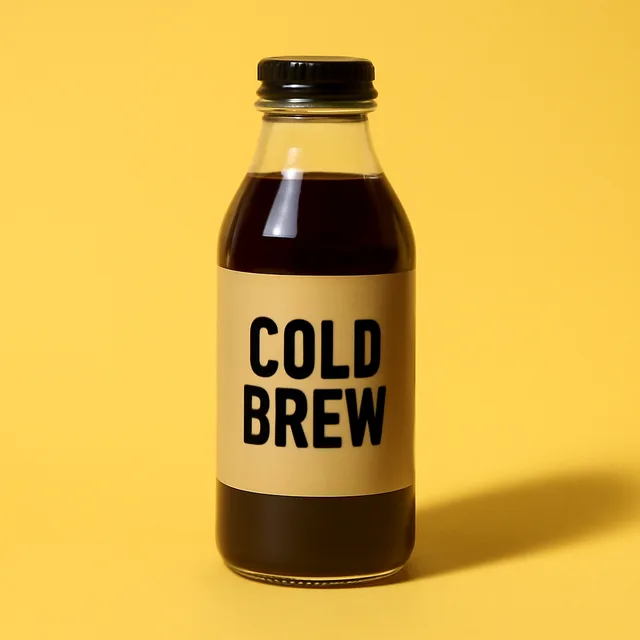
- GPT Image 1 mini: $0.0024 and 6.9 s, the cleanest label of the three. It is billed by tokens, so this image cost less than its $0.0054 list price.
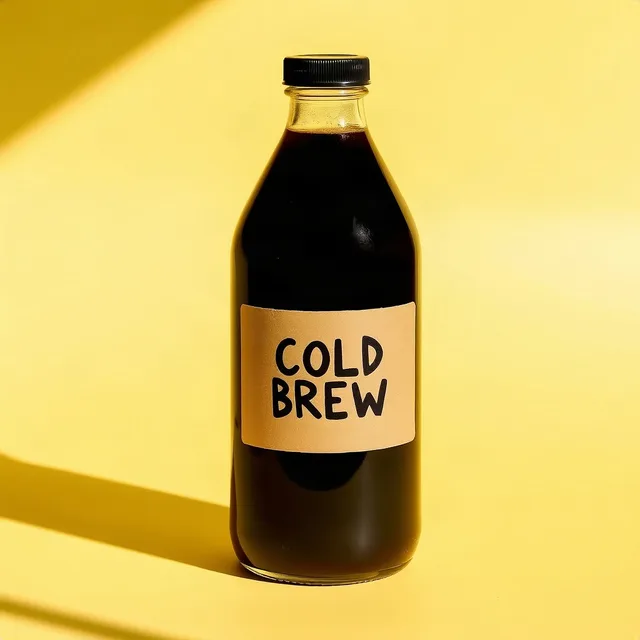
- Flux schnell: $0.0034 and 4.7 s, the fastest, with hand-lettered text and hard sunlight shadows.
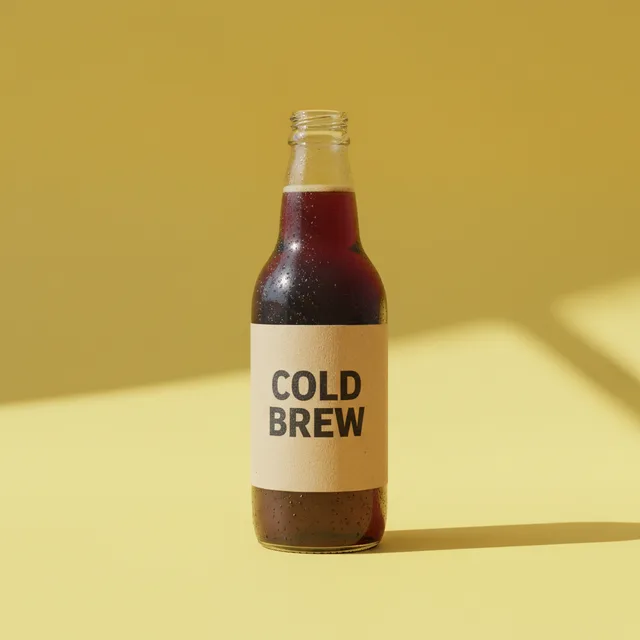
- Gemini 2.5 Flash Image (Nano Banana): $0.0418 and 6.4 s, about 17 times the price of GPT Image 1 mini; photoreal condensation, but the bottle came back without a cap.
- All three spelled COLD BREW correctly. The three images together cost $0.0477.
What comes back
What you get on every lookup, whichever source answers.
- Each model with what the call cost and how long it took
- The image each model returned, hosted for you to download or share
- What the whole comparison cost
- The comparison's id, to fetch it again
Providers
Same input and output for every provider. Success rate over 30 days shows after 5 real calls.
| Provider | Price per call | Status |
|---|---|---|
| FLUX.1 [schnell] | $0.00324 | Available |
| GPT Image 1 Mini | $0.0054 | Available |
| Nano Banana (Gemini 2.5 Flash Image) (image) | $0.042444 | Available |
| Sana | $0.00108 | Available |
| FLUX.1 [schnell] | $0.00324 | Available |
| FLUX 2 Flash | $0.0054 | Available |
| Z Image Turbo | $0.0054 | Available |
| FLUX.2 [klein] 4B | $0.0054 | Available |
| V4.0q [fast] | $0.00567 | Available |
| FLUX.2 [klein] 9B | $0.00648 | Available |
| Recraft V4.1 Flash Text to Image | $0.00756 | Available |
| V4.0q [instant] | $0.0081 | Available |
Frequently asked questions
Why does the price differ from model to model so much?
Each lab prices image generation differently: some per image, some by tokens. On this prompt, Gemini 2.5 Flash Image cost about 17 times what GPT Image 1 mini did. GPT Image 1 mini is billed by the tokens each image uses, so a call can cost less than its list price: this one cost $0.0024 against $0.0054. The table below lists the current price of every image model we sell.
Is the cheapest one good enough?
On this prompt GPT Image 1 mini, the cheapest, also had the cleanest label. Text, faces and hands vary by prompt, so compare a few models on your own prompt before you commit to one.
Can I compare more models, like Imagen?
Run the same prompt through any image models in the catalog (Flux, GPT Image, Gemini and others) with POST /v1/compare. Google Imagen is not in the catalog yet; Gemini 2.5 Flash Image is the Google image model available today.
What does a comparison cost?
The sum of each model's price, and failed calls are free. This one cost $0.0477 for three images. New accounts get $5 of credit.
Can my AI agent do this?
Yes. Add the Superpowers MCP server to Claude, Cursor, Codex or ChatGPT and ask it to compare image models on your prompt, or call POST /v1/compare with category image.generate and the tools you want.
For developersAPI request, full response, returned fields and MCP setup
We sent the same product-photo prompt to three image models through one API key and kept what each returned, what it cost and how long it took. Compare more models, or your own prompt, from the API or your AI agent.
Returned fields
summary[].tool / charge_usd / latency_msEach model with what the call cost and how long it tookresults[].images[].urlThe image each model returned, hosted for you to download or sharetotal_charge_usdWhat the whole comparison costcompare_idThe comparison's id, to fetch it againRequest
curl -X POST https://superpowers.tools/v1/run \
  -H 'Authorization: Bearer $SUPERPOWERS_KEY' \
  -H 'content-type: application/json' \
  -d '{"tool":"fal.flux-schnell","idempotency_key":"example-1","input":{"prompt":"Product photo of a glass bottle of cold brew coffee with a kraft paper label that reads COLD BREW, on a sunny yellow background, soft shadow, minimal","size":"square"}}'
Normalized response
Call made on 10/13/2026 through fal, OpenAI and OpenRouter through Superpowers, answered in 4730 ms. Comparison cmp_mI971ICl2ewraA. The images below are the ones each model returned, resized to 640 px.{
"compare_id": "cmp_mI971ICl2ewraA",
"category": "image.generate",
"input": {
"prompt": "Product photo of a glass bottle of cold brew coffee with a kraft paper label that reads COLD BREW, on a sunny yellow background, soft shadow, minimal",
"size": "square"
},
"total_charge_usd": 0.047671,
"summary": [
{
"tool": "openai.gpt-image-1-mini",
"status": "completed",
"charge_usd": 0.002432,
"latency_ms": 6896
},
{
"tool": "openrouter.google-gemini-2.5-flash-image.image",
"status": "completed",
"charge_usd": 0.041841,
"latency_ms": 6371
},
{
"tool": "fal.flux-schnell",
"status": "completed",
"charge_usd": 0.003398,
"latency_ms": 4730
}
],
"results": [
{
"tool": "openai.gpt-image-1-mini",
"images": [
{
"url": "https://superpowers.tools/files/hS5NTP8acH0l7tai.png"
}
]
},
{
"tool": "openrouter.google-gemini-2.5-flash-image.image",
"images": [
{
"url": "https://superpowers.tools/files/P7bGdPu1W3Bp1W6Y.png"
}
]
},
"…"
]
}MCP configuration
Add the MCP server to Claude, Cursor or another client and ask in plain language.claude mcp add --transport http superpowers https://superpowers.tools/mcp \ --header "Authorization: Bearer $SUPERPOWERS_KEY"
{
  "mcpServers": {
    "superpowers": {
      "url": "https://superpowers.tools/mcp",
      "headers": {
        "Authorization": "Bearer ${env:SUPERPOWERS_KEY}"
      }
    }
  }
}codex mcp add superpowers --url https://superpowers.tools/mcp \ --bearer-token-env-var SUPERPOWERS_KEY
More guides
Start with $5 of credit
Enough for 1,543 calls to FLUX.1 [schnell]. No card needed to start.