Your competitors' plans and prices in one table
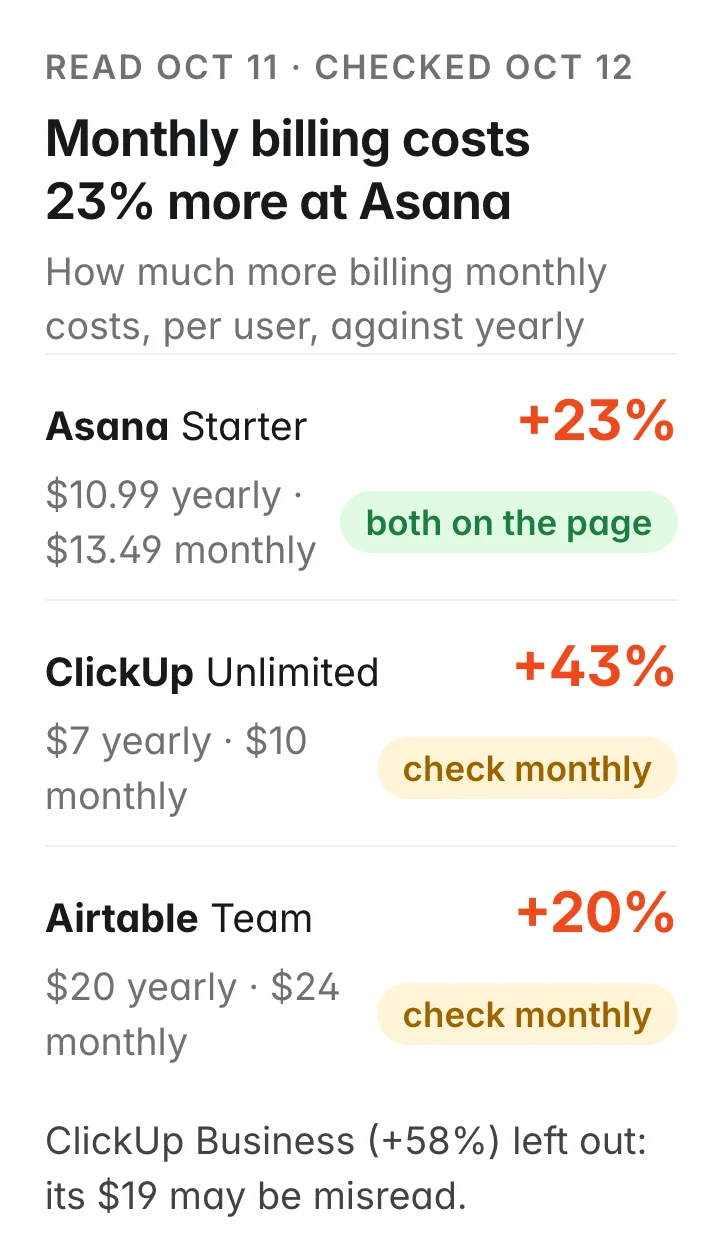
Asana charges 23% more per user for monthly billing ($13.49 against $10.99 yearly), and only Asana's pricing page says “billed monthly”.
Paste your competitors' pricing pages. You get every plan in one table, with the price billed yearly and billed monthly, how much more monthly billing costs, and three headline features, read from the live pages. Each price is checked against the page's own text so you know which ones to double-check.
Build me a pricing table for Airtable, ClickUp and Asana from their pricing pages: every plan, the price billed yearly and billed monthly, how much more monthly costs, and three headline features each.
What you get
- Every plan the browser reads on each pricing page, with the price per user billed yearly and billed monthly
- How much more each plan costs billed monthly
- Three headline features per plan
- A check mark on every price the page prints next to its plan, and a flag on the ones to double-check
A real run
We read the Airtable, ClickUp and Asana pricing pages on Oct 11, 2026 (20 cents a page, plus half a cent each for the page-text check) and checked every price against each page's own text on Oct 12. On Oct 12 a second read of Airtable's page gave the same four plans and prices. Prices change; brands are examples and we are not affiliated.
Asana charges 23% more per user for monthly billing ($13.49 against $10.99 yearly on its Starter plan), and only Asana's pricing page says “billed monthly”. Its Advanced plan is 22% more ($30.49 against $24.99).
ClickUp and Airtable print only their yearly prices; the monthly ones appear after you flip the billing switch, so they are flagged to check. Read that way, ClickUp's Unlimited plan is 43% more monthly ($10 against $7) and Airtable's Team plan 20% more ($24 against $20); a second read of Airtable's page on Oct 12 gave the same $24 and $54.
Check ClickUp's Business price before you use it: the browser read $19 monthly against $12 yearly, a 37% saving, but ClickUp's page says yearly saves “up to 33%”.
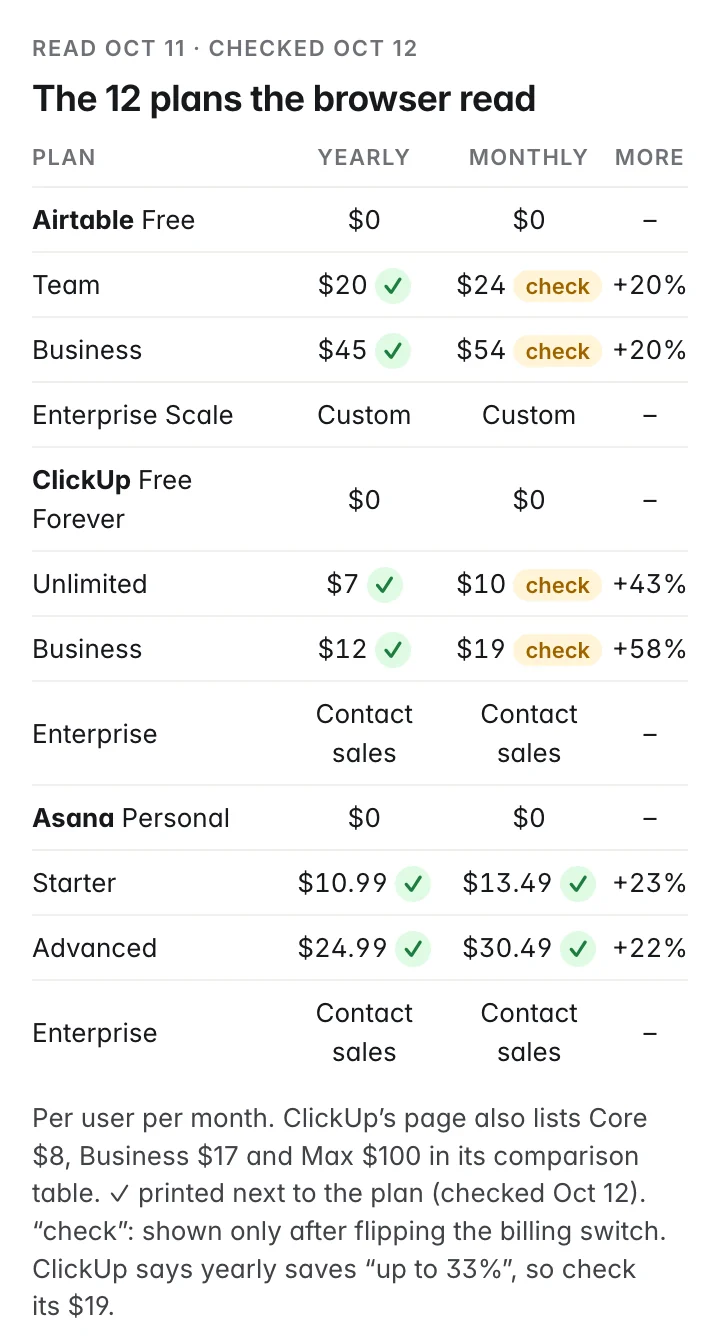
The browser read 12 plans, with three headline features each. Of the 12 prices of the 6 paid plans, 8 are printed next to their plan on the pages (checked Oct 12): all 4 at Asana, and the yearly ones at ClickUp and Airtable.
ClickUp's page also lists a second set of plans in its comparison table on Oct 12: Core $8, Business $17 and Max $100 a user a month (Max billed yearly, regular price $120). The browser did not read those; check which plans ClickUp sells you before you compare.
What you do with it: put your own plans in the same table, and if you sell monthly, know how far above yearly your competitors price it.
What came back
How much more monthly billing costs
- +23%Asana Starter · $10.99 yearly, $13.49 monthlyboth prices printed next to the plan · includes AI Teammates and Asana Dash · AI Studio · No user seat limits · pricing page ↗
- +22%Asana Advanced · $24.99 yearly, $30.49 monthlyboth prices printed next to the plan · includes AI Teammates and Asana Dash · AI Studio · Unlimited portfolios · pricing page ↗
- +43%ClickUp Unlimited · $7 yearly, $10 monthly$7 printed next to the plan; $10 only after flipping the billing switch · includes Unlimited Spaces/Folders/Forms · Unlimited Gantt Charts · Unlimited Integrations · pricing page ↗
- +58%ClickUp Business · $12 yearly, $19 monthly$19 not printed on the page; ClickUp says yearly saves “up to 33%”, so check it · includes Unlimited Dashboards with Advanced Cards · Unlimited Message History · Unlimited Activity Views · ClickUp's comparison table also lists a Business plan at $17 · pricing page ↗
- +20%Airtable Team · $20 yearly, $24 monthly$24 only after flipping the switch; a second read on Oct 12 gave the same · includes 15,000 AI credits per paid user each month · 50,000 records per base · 25,000 automation runs · pricing page ↗
- +20%Airtable Business · $45 yearly, $54 monthly$54 only after flipping the switch; a second read on Oct 12 gave the same · includes 20,000 AI credits per paid user each month · 125,000 records per base · 100,000 automation runs · pricing page ↗
How it works
Your AI assistant does these steps for you. You pay only for each run; nothing to install or configure.
Opens each pricing page and switches the billing toggle
A browser opens each page like a person would, reads every plan with yearly billing, flips the monthly/yearly switch and reads the prices again.
Checks each price against the page
It reads the page's own text and marks every price that appears there. Prices you only see after flipping the switch are flagged so you can check them yourself.
Puts it in one table
Every plan side by side, with how much more monthly billing costs, worked out from the prices, not estimated.
Questions
Where do the prices come from?
From each company's live pricing page. A browser opens the page, reads every plan, flips the monthly/yearly switch and reads the prices again. You get the link to each page.
Can it get a price wrong?
Yes, a browser can misread a page. That is why every price is checked against the page's own text: a check mark means the page prints that price next to the plan. Prices you only see after flipping the monthly/yearly switch can't be checked that way, so they are flagged for you to look at. Prices also change, so check the date.
What does it cost?
About 20 cents per pricing page plus half a cent for the price check, paid from your balance. A page the browser can't open costs nothing; a page it opens but finds no prices on still costs the 20 cents. New accounts start with $5 free.
Which pages work?
Public pricing pages. Pages behind a login, or that show prices only after you enter a team size or talk to sales, come back as Custom or Contact sales.
Will my competitor know?
No. It opens their public pricing page the way any visitor would. Nothing is sent to them.
How often should I run it?
Monthly is enough for most markets, or before a pricing decision or a sales call. Keep the same pages so you can compare the tables.
What if a page comes back empty?
The table says which page could not be read. If the browser could not open it, it costs nothing; if it opened the page and found no prices, the 20 cents are still charged. Pages that hide prices behind a login or a sales call come back as Custom or Contact sales.
More sales use cases
Prepare your next sales call with a sourced brief on the company
Vercel’s site says “scale from zero to millions instantly”; your call question is: when a traffic spike changes the bill, what is hardest to explain?
Marketing team work emails at the companies you sell to, under 2 cents each
44 of 50 marketing emails came back “valid”, but only 8 of those 44 could be confirmed with the company's mail server: 6 of the 7 companies accept mail for any address. 82 cents for all 50.
Find the companies that just won a public contract in your field
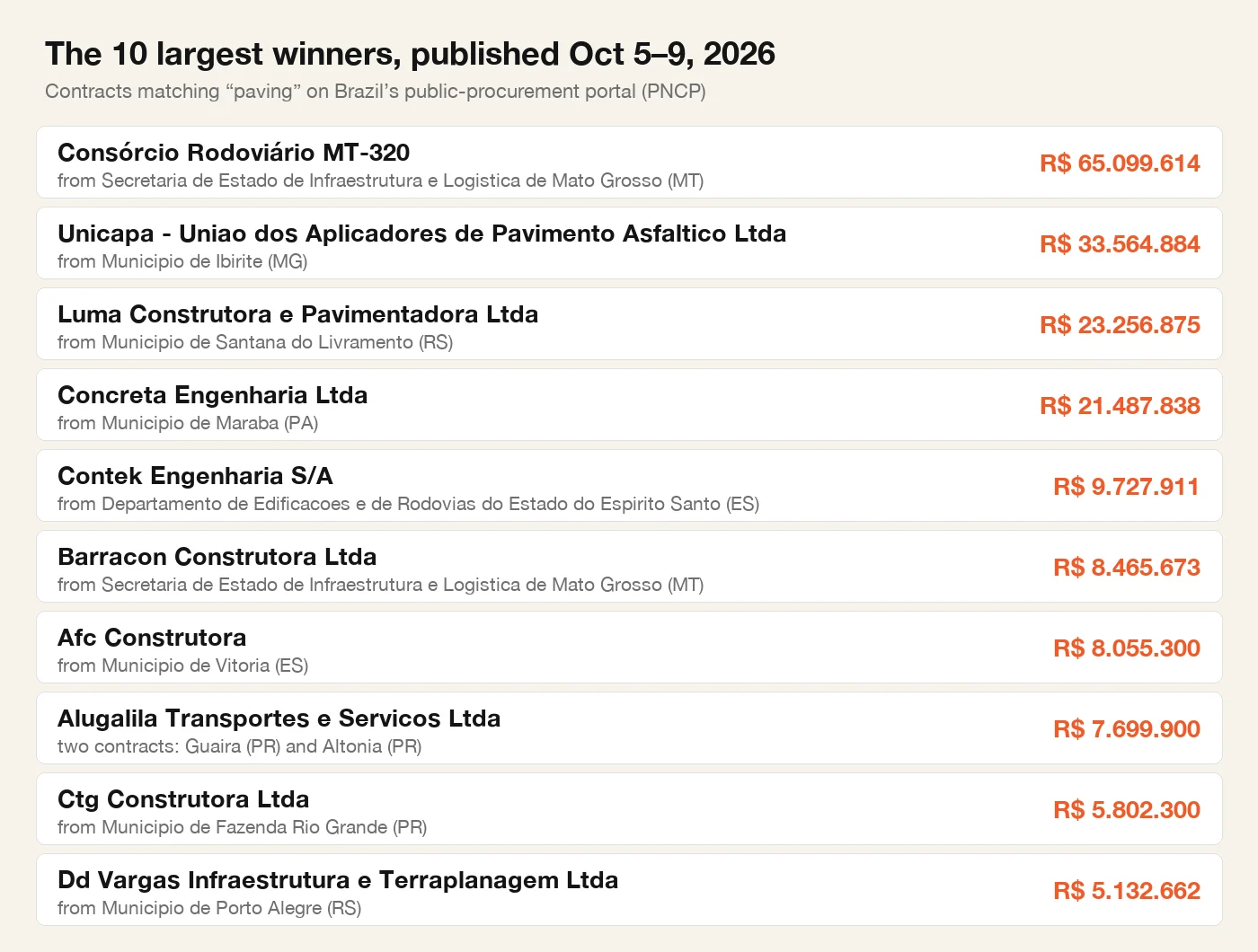
R$ 65 million to restore 86 km of one highway in Mato Grosso: the largest of 80 contracts matching “paving” that Brazilian agencies published Oct 5–9. One run lists the companies that won them, for less than a cent.
For developers · tools, inputs and run IDs behind this example
{
  "tool": "tinyfish.web-agent",
  "input": {
    "url": "https://clickup.com/pricing",
    "goal": "List every plan on this pricing page with the yearly and monthly price per user and three headline features. Return JSON."
  }
}
{
"tool": "tinyfish.fetch",
"input": {
"urls": [
"https://clickup.com/pricing"
]
}
}Run it from code or any agent: recipe, script and skill file ↗
Run IDs: run_KcwH-h4stz7OxQ, run_uAYP-MyEJaYACA, run_4K5YthzgeXTZMA · observed charge $0.6